Every event generates photos that matter with candid moments, group shots, personal memories that guests look forward to receiving long after the event is over. But in the rush to share those photos quickly, one critical question often goes unasked: who exactly can see these photos, and what can they do with them?
Sharing event photos through a generic link, whether it is a Google Drive folder, a WhatsApp group, or a basic gallery URL that gives photographers and event hosts almost no control over what happens next. Anyone who receives that link can view every photo, download everything, share the link further, or save images without permission. For events that include private moments, children, corporate attendees, or high-profile guests, this lack of control is not just inconvenient but it is a genuine privacy risk.
The good news is that securely sharing event photos with guests is no longer complicated. The right platform gives you complete control over who sees what, what they can download, and how your photos are protected from unauthorized access, without making the experience difficult for your guests.
In this guide, we cover everything you need to know about how to securely share event photos with guests and prevent unauthorized access in 2026.
Why Secure Photo Sharing Matters for Events
Photo privacy at events is a topic that does not get enough attention until something goes wrong. Here is why secure photo sharing matters more than most photographers and event hosts realize:
Guest Privacy is a Real Responsibility
When guests attend an event, they trust that their photos will be handled responsibly. They do not expect their images to be accessible to strangers, shared without their knowledge, or downloadable by anyone who happens to receive a forwarded link. For events involving children, private family gatherings, or sensitive corporate functions, this responsibility is even greater. Photographers and event hosts who share photos through unprotected links are putting their guests’ privacy at risk often without realizing it.
Unauthorized Downloads Can Undermine Your Work
For professional photographers, unprotected photo sharing creates a business risk alongside the privacy risk. When photos are shared through an open link with no download restrictions, anyone can save high resolution images without paying for them, use them without credit, or redistribute them without permission. This directly undermines the value of the photographer’s work and creates situations that are difficult to resolve after the fact.
Generic Sharing Links Offer Zero Control
Most people default to sharing event photos through tools like Google Drive, Dropbox, or WhatsApp because they are familiar and convenient. But these platforms were not built for event photo privacy. A Google Drive link shared with one guest can be forwarded to ten more. A WhatsApp message with photos can be saved, shared, and redistributed instantly. There is no way to control who sees the photos, who downloads them, or where they end up, once the link is out, the photos are out.
Privacy Breaches Are Harder to Fix Than to Prevent
Once an unprotected photo has been downloaded, shared, or redistributed, there is very little that can be done to reverse the damage. A photo of a guest shared without their consent, a corporate event image used out of context, or a private family moment reaching an unintended audience, these situations are far easier to prevent with the right platform than to address after they happen. Secure photo sharing is not an optional extra, it is a baseline responsibility for anyone delivering event photos professionally.
Common Ways Event Photos Get Exposed Without Protection
Before looking at solutions, it helps to understand exactly where the gaps in event photo security typically appear. These are the most common ways event photos end up in the wrong hands:
Generic Link Sharing – Anyone With the Link Sees Everything
Platforms like Google Drive and Dropbox operate on a simple principle, if you have the link, you have access. When an event photographer shares a folder link with a client, that client can forward the link to anyone. Every person who receives that forwarded link has the same full access to every photo in the folder, regardless of whether those photos include them or are meant for them. There is no identity verification, no access control, and no way to know how many people have accessed the folder or downloaded its contents.
WhatsApp and Messaging Apps – No Access Control Whatsoever
WhatsApp, Telegram, and similar messaging apps are the most common way people share photos casually and the least secure option for event photo delivery. Photos shared through messaging apps can be saved automatically to the recipient’s camera roll, forwarded to unlimited contacts, and shared in groups without any restriction. There is no concept of access control, download permissions, or photo protection in a messaging app environment. What gets shared gets shared permanently.
Basic Gallery Platforms – Limited Privacy Controls
Many basic gallery platforms offer a link that gives guests access to an entire event gallery, similar to Google Drive’s all-or-nothing approach. Some offer a password to restrict initial access, but once a guest is inside the gallery, they typically have access to every photo regardless of whether those photos include them. Download permissions are often either fully on or fully off, with no granular control over what individual guests can save or access.
What to Look for in a Secure Event Photo Sharing Platform
Not every photo sharing platform is built with privacy in mind. When evaluating a platform for securely sharing event photos with guests, here are the key features to look for:
Identity-Based Access Control
The most important privacy feature any event photo sharing platform can offer is the ability to control who sees which photos based on identity, not just who has the link. A platform that requires guests to verify their identity before accessing photos ensures that each guest only sees what is meant for them, and nothing more. This goes far beyond a simple password, it means the access itself is personalized to each individual guest.
Per-Event Download Controls
Download permissions should not be a global on/off setting across all your events. Different events have different needs for example a corporate event may require photos to be view-only while a wedding gallery may allow full downloads for guests. The right platform lets you control download permissions individually for each event, giving you the flexibility to match the privacy requirements of every shoot.
Original Resolution Download Control
Even when downloads are permitted, there should be a distinction between downloading a web-optimized version and downloading the original full resolution file. For photographers who need to protect their high resolution work, the ability to allow standard downloads while restricting original file access is an important layer of control that most platforms do not offer.
Password Protection
Password protection adds a basic but effective first layer of security to any event gallery. Before guests can access any photos, they must enter a password preventing casual unauthorized access from anyone who stumbles across the gallery link. For private events like family gatherings, intimate weddings, or corporate functions, password protection is a simple and reliable way to keep the gallery restricted to invited guests only.
Photo Watermarking
Watermarking is one of the most effective ways to protect photos from unauthorized use. When photos are watermarked, any image that is saved, screenshotted, or redistributed without permission carries the photographer’s branding making unauthorized use immediately visible and protecting the photographer’s intellectual property. For event photographers who share preview galleries with clients before final delivery, watermarking is an essential tool.
Right Click Protection
Right click protection prevents guests from saving photos directly from the browser using the standard right-click save function. While it does not prevent every possible method of saving an image, it removes the easiest and most common route for casual unauthorized downloading making it a useful additional layer of protection alongside other privacy controls.
Audit Trail and Access Visibility
Knowing who has accessed your event gallery and when is a valuable privacy feature that most platforms overlook. An audit trail showing impressions, downloads, and visibility data for each event gives photographers and event hosts full visibility into how their photos are being accessed and by whom, allowing them to identify any unusual activity quickly.
How TurtlePic Lets You Securely Share Event Photos with Guests
TurtlePic is built around the idea that every guest at an event deserves a personalized, private photo experience and every photographer and event host deserves complete control over how their photos are accessed, downloaded, and protected. Here is a detailed look at every privacy feature TurtlePic offers for secure event photo sharing:
Selfie-Based Customized Access – The Most Secure Way to Share Event Photos
This is TurtlePic’s most unique and powerful privacy feature and one that no mainstream photo sharing platform currently offers.
Most platforms operate on an all-or-nothing access model. When you share a Google Drive link or a Dropbox folder with a guest, that guest can see every single photo in the folder. Share that same link with ten guests and all ten can see everything regardless of whether the photos include them or were meant for them. The link is the key, and whoever has the key gets full access.
TurtlePic works completely differently. When an event gallery is created on TurtlePic, a private link is generated that can be shared with guests. But receiving that link does not give guests access to the full gallery. Instead, guests are required to click a selfie when they open the link. TurtlePic’s AI face recognition with 99.9% accuracy then scans the gallery and shows each guest only the photos that include them.
If a guest’s photos exist in the gallery, they see their photos and only their photos. If no photos of that guest exist in the gallery, they cannot view anything at all. The link alone gives access to nothing, identity is the key, not the URL.
This means that even if a guest forwards the private link to someone who was not at the event, that person will open the link, take a selfie, and see nothing because their face does not exist in the gallery. The privacy is built into the access mechanism itself, not just applied as a layer on top of it.
For event photographers and hosts managing large gatherings with hundreds of guests, this level of personalized access control is a genuine game changer ensuring every guest gets a private, curated view of their own photos without any risk of unauthorized access to the full gallery.
Password Protected Events
TurtlePic allows photographers and event hosts to add password protection to any event gallery. Before guests can access the gallery or take their selfie for personalized access, they must enter the correct password adding a reliable first layer of security that keeps the gallery restricted to invited guests only.
Password protection works particularly well for private events like intimate weddings, family gatherings, corporate functions, or any event where access needs to be tightly controlled from the very first step. Combined with selfie-based access, it creates a two-layer security system where guests must first know the password and then verify their identity before seeing any photos.
Right Click Protection
TurtlePic’s right click protection prevents guests from saving photos directly from the browser using the standard right-click save function. When guests view their photos in a TurtlePic gallery, the right-click menu is disabled removing the most common and easiest route for casual unauthorized photo saving.
While no digital protection is completely foolproof, right click protection significantly raises the barrier for unauthorized downloading ensuring that guests who want to save photos can only do so through the download options that the photographer or event host has explicitly permitted.
Download Enabled or Disabled on an Event Basis
TurtlePic gives photographers and event hosts full control over download permissions on a per-event basis. For each event created on the platform, the host can choose whether guests are allowed to download photos at all or whether the gallery is view-only.
This per-event control is significantly more flexible than the global download settings most platforms offer. A corporate event where photos are shared for viewing purposes only can have downloads completely disabled, while a wedding gallery can have full downloads enabled for all guests managed independently without affecting any other event on the account.
Enable or Disable Original Image Download
TurtlePic takes download control one step further with the ability to separately control whether guests can download the original full resolution file or only a web-optimized version of their photos.
This is an important distinction for professional photographers. Allowing guests to download their photos is a reasonable and expected part of event photo delivery. But giving every guest unrestricted access to the original high resolution files that represent the photographer’s professional work and commercial value is a separate decision entirely.
With TurtlePic, photographers can enable standard downloads for guests while keeping original resolution files restricted, giving guests a great experience without compromising the photographer’s control over their highest quality work.
Photo Watermarking
TurtlePic’s watermarking feature allows photographers to overlay their branding on photos displayed in the gallery protecting their work from unauthorized use and ensuring that any photo saved through a screenshot or screen recording carries visible attribution.
Watermarking is particularly useful for preview galleries shared with clients before final delivery, or for events where the photographer wants to protect their work while still giving guests a full view of their photos. Any image that leaves the gallery without authorization immediately identifies itself as the photographer’s work making misuse visible and protecting intellectual property in a practical and effective way.
Step by Step – How to Securely Share Event Photos with Guests on TurtlePic
Setting up secure event photo sharing on TurtlePic is straightforward. Here is a step by step walkthrough of how to share event photos with guests securely while keeping full control over access, downloads, and privacy:
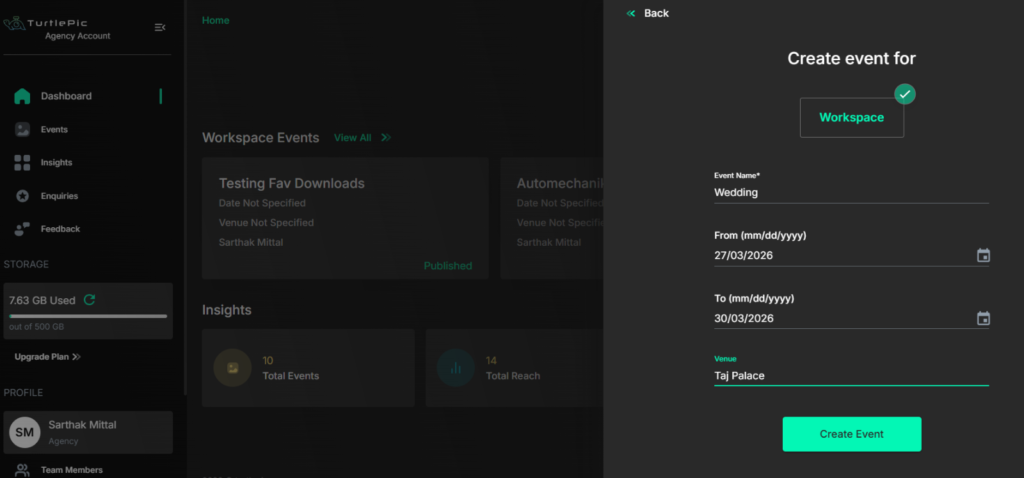
Step 1 – Create Your Event on TurtlePic
Start by creating a new event on TurtlePic. Give your event a name, set the event date, and configure your basic event details. This is where your gallery is set up and where all your privacy settings will be applied before any photos are shared with guests.
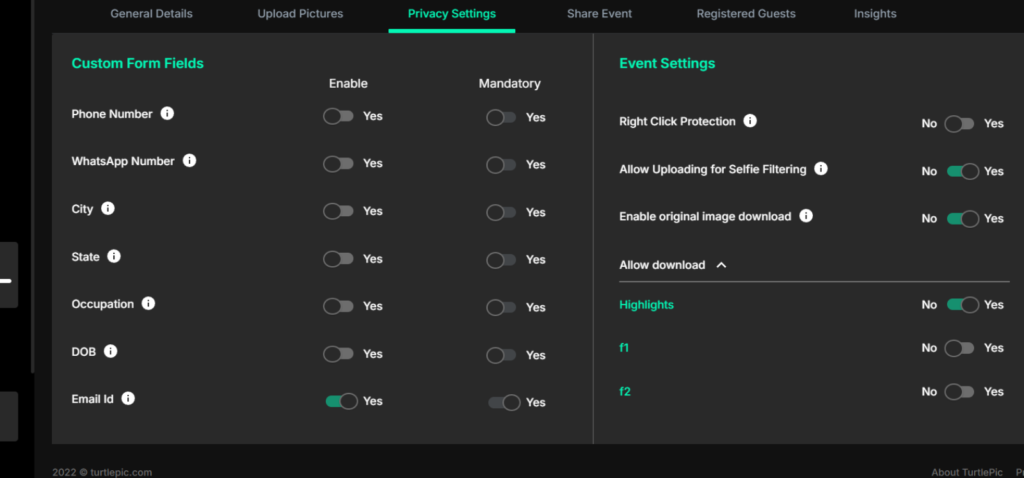
Step 2 – Configure Your Privacy Settings
Before uploading any photos, set your privacy preferences for the event like password protection, download permissions, original resolution download control, watermarking, and right click protection. Taking a few minutes to configure these settings ensures your photos are protected from the moment the first guest accesses the gallery.
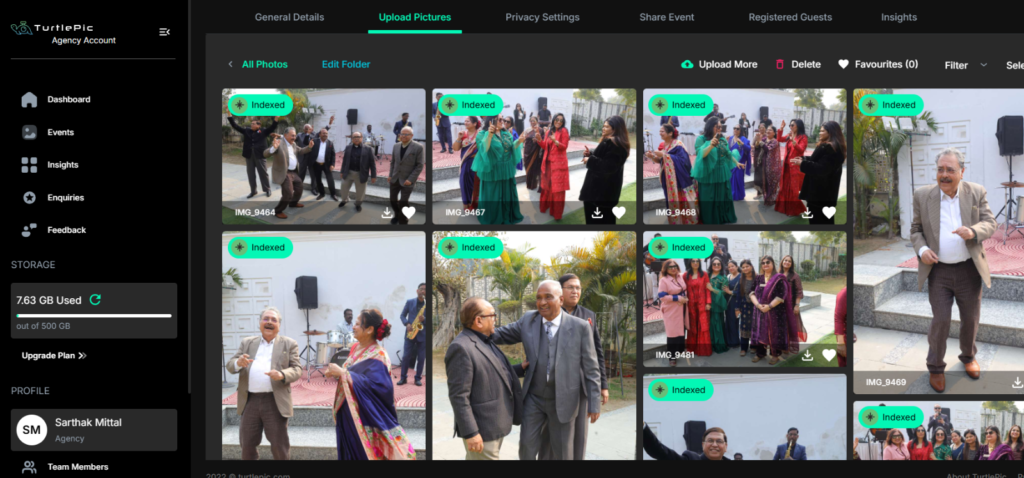
Step 3 – Upload Your Edited Photos
Once your privacy settings are configured, upload your edited event photos to the gallery. TurtlePic stores and delivers every photo in the original resolution it was uploaded with no compression and no quality loss. Bulk upload keeps the process efficient for large events with thousands of photos.
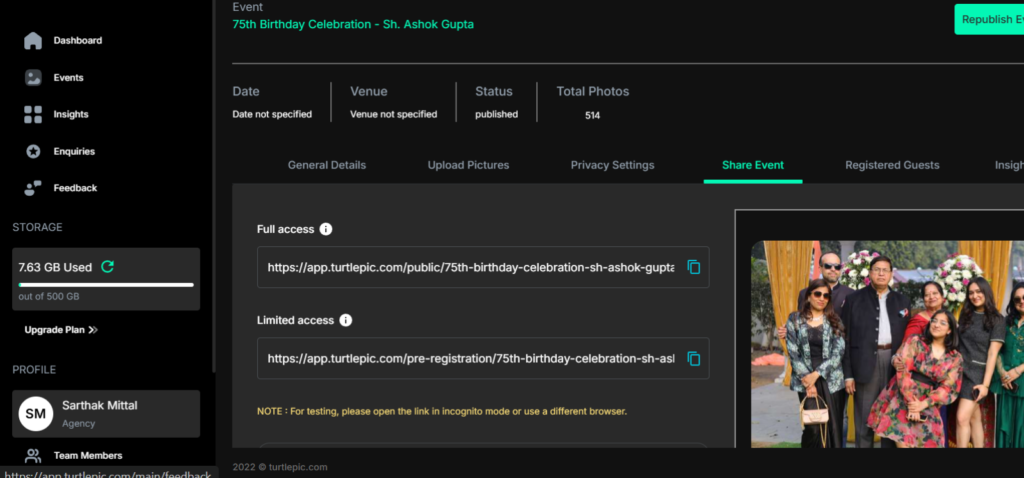
Step 4 – Generate and Share Your Preferred Link
TurtlePic generates two types of sharing links – a public link and a private link giving you the flexibility to choose the access model that best suits your event.
With the public link, guests can view all photos in the gallery and search for their own photos among thousands with just a selfie click. With the private link, guests cannot view any photos until they verify their identity with a selfie and only their own photos become visible if they exist in the gallery. If no photos of them exist, they cannot view anything at all.
Both links can be shared via WhatsApp, email, SMS, or as a QR code directly at the event.
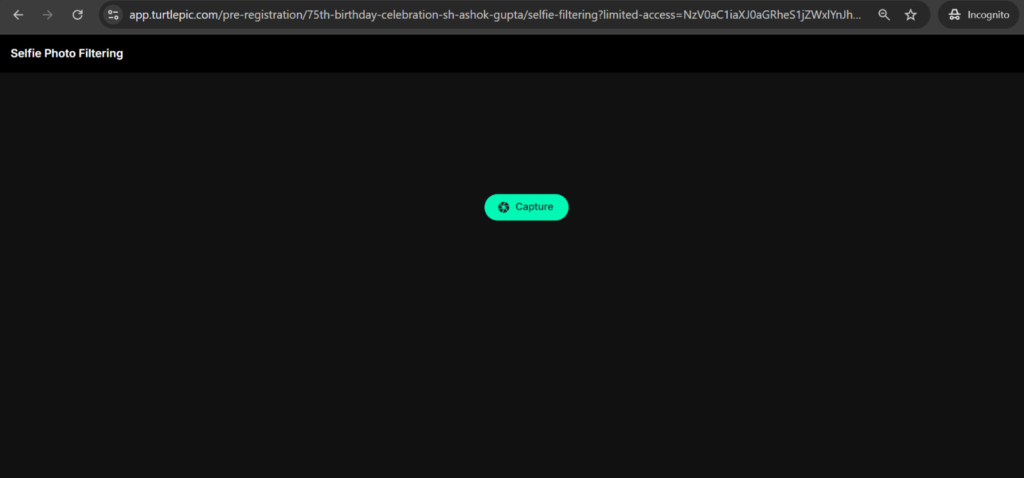
Step 5 – Guests Verify Identity with a Selfie
When a guest opens the private link, they are prompted to click a selfie. TurtlePic’s AI face recognition scans the gallery and shows each guest only the photos that include them instantly and automatically. The experience feels seamless for guests while the privacy protection happens invisibly in the background.
Step 6 – Guests Access and Download Their Photos
Once guests are able to view their photos and – if download permissions are enabled then they can download their photos from their personalized gallery. Bulk download is available at both guest and admin level, and every access and download is tracked in TurtlePic’s analytics dashboard giving photographers and event hosts full visibility into how their photos are being accessed.
Conclusion – The Smartest Way to Securely Share Event Photos with Guests
Sharing event photos with guests should never come at the cost of privacy. Yet for most photographers and event hosts, the default tools are Google Drive links, WhatsApp groups and some basic gallery platforms which offer little to no real control over who sees what, who downloads what, and where photos end up after they leave your hands.
Secure event photo sharing is not just about protecting your work as a photographer. It is about respecting the privacy of every guest whose face appears in your gallery, maintaining control over your highest quality files, and delivering a photo experience that feels as professional and thoughtful as the event itself.
TurtlePic brings together every privacy feature that event photo sharing demands, selfie-based customized access that makes the link alone worthless without identity verification, password protection, right click protection, per-event download controls, original resolution download management, and photo watermarking. No other platform combines all of these features in a single purpose-built event photo sharing experience.
Whether you are sharing photos from an intimate private gathering or a large-scale corporate event, TurtlePic gives you the confidence that every photo reaches the right person, stays protected from unauthorized access, and is delivered in the quality your work deserves.
Secure photo sharing is not complicated when you have the right platform. With TurtlePic, it is simply how every event gallery works.
Create your event today and share your photos securely with your guests.