
Guest communication
Copy-ready invitation, reminder and thank-you messages for company and campus events, then send them automatically on WhatsApp and email.
30-minute demo on Google Meet, on your own event photos
Trusted by 1,000+ businesses · 500K+ users · 30+ countries


IN SHORT
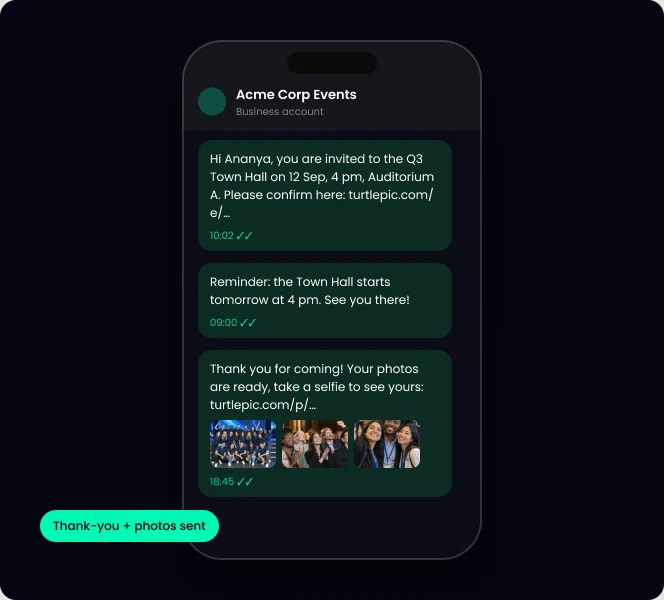
Below are WhatsApp event invitation message samples for town halls, annual days, conferences and convocations, ready to copy. With TurtlePic you can send them automatically: invite, reminder and a thank-you with each guest’s photos, on WhatsApp and email.
Copy any sample and change the details in [brackets].
Hi [Name], you are invited to our [Q3] Town Hall on [date] at [time], [venue]. Please confirm here: [link]
Dear [Name], join us for [Company] Annual Day [year] on [date]. Agenda and venue: [link]
Hi [Name], your seat at [Conference] is confirmed for [date]. Your entry pass: [link]
Congratulations, [Name]! Convocation is on [date] at [venue]. Details and family passes: [link]
Reminder: [Event] is tomorrow at [time], [venue]. Map and agenda: [link]
[Event] starts in 1 hour. See you at [venue]!
Subject: You are registered for [Event]. Body: date, venue, add to calendar, entry pass link.
Subject: [Event] is tomorrow. Body: time, venue, what to bring.
Subject: Thank you for coming, your photos are ready. Body: selfie link to find your photos.
Step 1
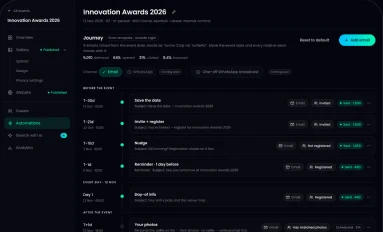
Goes out on WhatsApp and email to your guest list.
Step 2
Sent on the days you choose.

Step 3
A thank-you with each guest’s own photos.
| WhatsApp broadcast list | TurtlePic automated messages | |
|---|---|---|
| Personal name and link | No | Yes |
| Email at the same time | No | Yes |
| Reminders on a schedule | By hand | Automatic |
| Photos after the event | No | Each guest’s own photos |
By the numbers
Built by Experts. Trusted by Innovators.

Trusted by 1K+ companies
500K+
Worldwide users
10K+
Events created
99.9%
Accuracy of AI
10M+
Photos found by AI
Broadcast lists only reach people who saved your number and cannot personalise. TurtlePic sends personalised invites to your whole guest list automatically.
Yes. The same message goes out on both channels.
Yes. Every message and its timing is customisable.
Yes. After the event, each guest gets a link to find their own photos with a selfie.
We will send a sample invite to your phone during the demo.
Book a demo30-minute call on Google Meet · pick a time that suits you