The best photo delivery apps for event photographers in 2026 are the ones that combine reliable bulk uploads at event scale, true full-resolution delivery, and pricing that does not assume an enterprise budget. TurtlePic is our top pick against those criteria. Prioritise speed, batch stability, image fidelity, privacy controls, and per-event vs subscription pricing to avoid delivery failures and save time after large events.
The event has wrapped. The last guest has left. You’re back at your desk at midnight, 2,400 JPEG files sitting on your hard drive, and your client is already texting: “When will we get the photos?” This scenario plays out after every large event, from Mumbai corporate galas to destination weddings in Rajasthan, and it’s the moment when a poor delivery workflow costs you both time and reputation.
If you’re asking what is the best photo delivery app for event photographers in 2026, you’re not alone, it’s one of the most practical questions working photographers face right now. Choosing the right platform is no longer optional; it’s as essential as your camera body. Platforms like TurtlePic are changing how photographers handle this problem, replacing the old “send a WeTransfer link and hope for the best” approach with AI-powered guest matching, full-resolution galleries, and delivery that can begin while you’re still on-site. By the end of this guide, you’ll know which event photo sharing platform fits your workflow, your event size, and your budget.
What actually makes a photo delivery app worth your time
Most apps look impressive in a feature comparison table and fall apart the moment you’re dealing with a 600-guest wedding at a venue with patchy cellular coverage. Before committing to any platform, you need an evaluation framework grounded in what Indian event photographers actually face every week.
Speed and batch handling at scale
Upload speed and batch stability are non-negotiable for large events. A multi-day wedding produces photo volumes in the thousands before culling, and the delivery system needs to handle bulk uploads without throttling or queue failures. File format support matters too: most event delivery platforms are optimised for JPEG, and RAW support is inconsistent. Pixieset, for example, lists RAW uploads on its Pro and Ultimate plans (checked 11 August 2026). If your workflow ends at JPEG export anyway, this isn’t a problem, but confirm it before you sign up rather than after an event.
Image quality and compression trade-offs
Consumer sharing tools compress photos aggressively, and clients notice the moment they send a file to print. Full-resolution delivery means your client receives the same JPEG you uploaded, not a web-optimised preview with compression artefacts. When a client orders a large wedding album or a corporate client uses your images for a marketing campaign, the difference between an original file and a compressed version is clearly visible. Choose a platform that delivers exactly what you upload.
Privacy controls and guest access
Private galleries, password protection, and link expiry are widely desirable features, check each vendor’s current plan details to confirm which tier includes them. Beyond access controls, consider how guests actually find their photos: QR code scanning at the venue, a selfie-based AI face search, a direct email link, or a WhatsApp message. Each method suits different event types. A corporate conference lends itself to QR code entry; a wedding with older guests works better with a WhatsApp link that opens a simple browser gallery.
Pricing model: per-event vs. subscription
Monthly subscriptions suit studios with a steady, year-round event calendar. For independent photographers working seasonally or on fewer than ten events a month, per-event pricing is often significantly more affordable, though the exact crossover depends on your edited photo counts and each platform’s overage structure. Some platforms charge per guest or per attendee, and those fees can compound quickly at large Indian weddings. Know your typical event volume before committing to any pricing structure.
What are the best photo delivery apps for event photographers? Our top pick
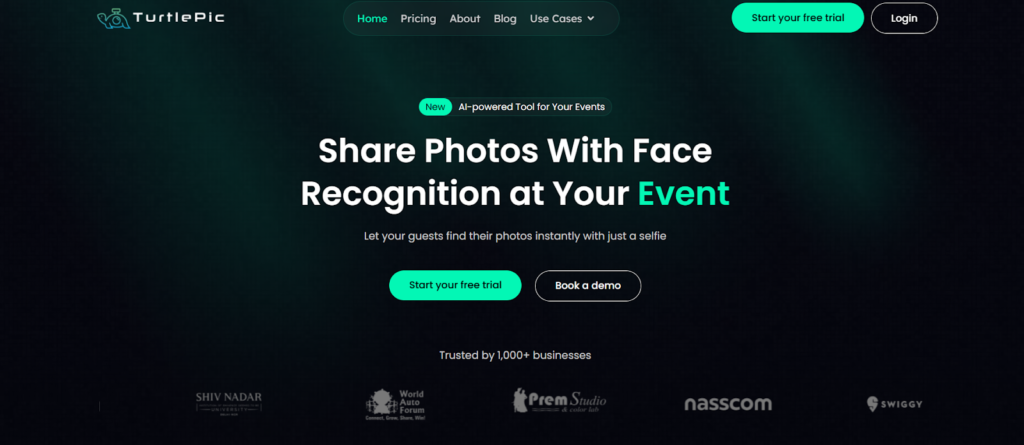
TurtlePic is an AI photo sharing platform for events. It is the platform that makes the most sense for photographers who need speed, full-resolution quality, and pricing that doesn’t assume an enterprise budget. Here’s what the actual experience looks like when you set up an event.
How AI face matching changes the guest experience
When a guest arrives at a TurtlePic event gallery, they take a selfie. The system scans the event library and returns only the photos where that guest appears, typically within seconds. For a 600-guest corporate event or a large Indian wedding, this makes a real difference to how guests experience photo delivery. Rather than scrolling through hundreds of images trying to spot themselves, they receive a personal gallery almost instantly. According to TurtlePic, the matching runs directly in the mobile browser with no app download required for guests, which removes a major source of friction at large events, and means fewer “can you find my photos?” messages landing in your inbox the following morning.
High-resolution delivery without the compression penalty
TurtlePic’s platform is built to deliver photos at the resolution you upload. According to their feature documentation, clients receive full-res JPEGs rather than web previews, and photographers can enable watermarks if they prefer to hold back final files until payment is confirmed. For wedding photographers producing prints and corporate clients producing marketing material, this matters. What you shoot is what your client receives.
Pricing built for independent photographers
To understand why TurtlePic’s pricing model stands out, it helps to see what the alternative looks like. Enterprise-focused platforms such as SpotMyPhotos run pro plans at USD 195 to USD 295 per month billed monthly, or USD 142 to USD 208 billed annually, plus overages at USD 29 per additional 1,000 photos beyond the monthly cap, plus USD 49 per extra device licence. That structure works for high-volume studios operating in the US market. For Indian event photographers working on per-event economics, it’s difficult to justify. TurtlePic offers per-event pricing designed for independent and boutique studios, visit turtlepic.com for current plan details, as pricing can change.
Other photo delivery platforms worth considering
A fair review means looking at the alternatives honestly, noting their genuine strengths alongside their real limitations.
SpotMyPhotos: feature-rich but priced for enterprise budgets
SpotMyPhotos offers a solid event dashboard, multi-channel delivery via SMS, email, WhatsApp, and AirDrop, and a consent-first matching approach rather than traditional facial recognition. These are genuine features worth noting.
The limitations are structural (pricing checked 11 August 2026): pro plans run at USD 195 to USD 295 per month billed monthly, or USD 142 to USD 208 billed annually, with photo overages at USD 29 per 1,000 and additional device licensing at USD 49 each, plus USD 20 per event for photo auto-optimisation on the Pro plan.
For an independent photographer working a seasonal calendar, a subscription at this level is difficult to absorb, particularly once overages are factored in. The platform is clearly designed for high-volume operators at US market pricing.
Kamero and FotoOwl
Kamero makes the first event free and offers both pay-per-event and subscription plans, with no guest limits stated on its pricing page (checked 11 August 2026). That structure suits photographers building a client base who want to avoid a monthly commitment. FotoOwl is the most visible competitor in this category by search presence and maintains unusually thorough public documentation. We have not run a controlled comparison of face-matching accuracy across these platforms, so we do not claim that one is more reliable than another. Test each on a real batch from one of your own events before committing to it.
Guest access: what to check before you buy
The entry methods a platform supports are a purchasing criterion, not a detail. QR code scanning, selfie-based face matching, and direct links by email or WhatsApp each suit different event types, and a platform that only does one of them narrows the range of jobs you can take. Check which methods are available on the plan you are actually buying rather than on the vendor front page. For a fuller comparison of how each method plays out for guests, and which platforms lead on it in India, see our guide to the best event photo sharing app in India.
Pricing reality: what these apps actually cost in 2026
The headline price is rarely the total cost. Before choosing a platform, work through the full maths against your typical event profile.
Subscription vs. per-event pricing: which works for you
A fixed monthly subscription priced in US dollars is a different kind of commitment for a studio that bills in rupees on a seasonal calendar. Spread across a busy month the per-event cost looks reasonable. Across a quiet month it does not change at all.
The overage structure matters just as much as the subscription. At USD 29 per additional 1,000 images, a run of large weddings can push you past the monthly cap more than once, which is why the cap deserves more attention than the headline price. Per-event pricing, offered by more accessible photo delivery apps in India including TurtlePic, fits a calendar that is seasonal rather than year-round.
Hidden costs to watch for
Several platforms layer additional charges on top of the headline subscription. SpotMyPhotos, for example, charges USD 29 per 1,000 photos beyond the monthly cap, USD 49 per extra device licence, and USD 20 per event for photo auto-optimisation on the Pro plan. Before choosing any platform, calculate your typical event’s final edited photo count, multiply by your monthly event volume, and map it against the overage structure. The cheapest headline plan is frequently not the cheapest in practice. Understanding this distinction before committing saves a significant amount of money over a shooting year.
Quick setup checklist before your next event
A clear workflow before, during, and after the event is what separates a smooth delivery from a stressful one. Run through these three phases every time.
Before the event: account and gallery setup
- Create the event and configure privacy settings, deciding whether the gallery is reachable by QR code or needs a password.
- Generate the QR code or sharing link and test it in both an Android and an iPhone browser.
- Confirm the selfie-to-match flow works end to end before the day, not on the day.
- Upload your studio logo now if the platform supports branded galleries, rather than the night after the event.
Day of: uploading and sharing in real time
- Bulk upload from the desktop app or the mobile uploader, depending on where you are after the shoot.
- Make the gallery visible at the right moment: after the formal proceedings at a corporate event, after the ceremony at a wedding.
- Share the QR code at that moment, and have the link ready for the event coordinator to send on.
After the event: full-res delivery and follow-up
- Confirm full-resolution downloads are enabled for every guest.
- Set link expiry if your delivery terms require it.
- Send the client or organiser the gallery link with clear instructions for guests.
Platforms like TurtlePic handle the photo-to-guest matching automatically, which means you spend less of the following morning sorting images by attendee or answering a stream of messages from guests who cannot find themselves.
Choosing the right platform for your workflow
Four questions will narrow your choice quickly. How large are your typical events? What is your monthly event volume? Do your clients expect AI face matching, or are they comfortable browsing a gallery themselves? And what delivery channel do your guests actually use: QR at the venue, WhatsApp after the event, or both?
So what is the best photo delivery app for event photographers working in India in 2026? For most independent and boutique studio photographers, TurtlePic is the strongest all-round option. It offers AI-powered face matching, full-resolution delivery, no compression penalty, and pricing structured for studios that shoot seasonally rather than at enterprise volume. The platform handles the entire delivery workflow from bulk upload to personal guest gallery without requiring guests to download an app or create an account, which is exactly what your clients and their guests expect from a professional photographer.
If you’re ready to move away from WhatsApp dumps and shared drive links, set up your first event on TurtlePic and see what a proper delivery workflow feels like.
Two neighbouring questions are covered separately. If you are choosing where the finished gallery lives for the client rather than for guests, see our comparison of client gallery platforms for photographers. If the constraint is your turnaround rather than your tooling, see how event photographers can deliver photos faster.
Frequently Asked Questions
What makes a photo delivery app worth using for event photographers?
Four things decide it in practice: whether bulk uploads stay stable at event scale, whether the platform returns your files at full resolution or a compressed copy, what privacy and guest-access controls it gives you, and whether the pricing model matches how often you shoot. Check the compression behaviour and the monthly upload cap before you commit, because those are the two that are hardest to work around afterwards.
Why do upload speed and batch handling matter so much at large events?
A multi-day wedding or a large corporate event produces photo volumes in the thousands, and the delivery platform has to absorb that in bulk without throttling or dropping the queue. Venue connectivity is the other half of the problem: if you intend to start delivering while you are still on site, test the upload path on the actual network before the event rather than discovering the limit during it.
What does TurtlePic offer event photographers?
TurtlePic matches each guest to their own photos using AI face recognition, delivers files at the original resolution they were uploaded in, and lets you start delivering while you are still at the venue. It is priced for independent and boutique studios rather than on an enterprise device-licence model.
Do photo delivery platforms support RAW files?
Support is inconsistent, and most event delivery platforms are built around JPEG workflows. Some client-gallery platforms do accept RAW on their higher tiers: Pixieset lists RAW photo support on its Pro and Ultimate plans, checked 11 August 2026. If RAW delivery is part of your pipeline, confirm the vendor policy against the specific plan you intend to buy, before an event rather than after one.
How do guests find their photos at an event?
Through whichever entry method the platform supports: scanning a QR code at the venue, taking a selfie so face recognition can match them to their own images, or receiving a direct link by email or WhatsApp. Match the method to the event. QR codes on table cards and signage work well where people are already moving around, and a direct link tends to reach guests who are less comfortable scanning codes.
Should I choose per-event pricing or a monthly subscription?
It depends on how many events you shoot and how predictable that number is. A subscription is usually better value once you are shooting consistently every month, while per-event pricing suits a seasonal or irregular calendar because a quiet month costs nothing. Read past the headline rate: check the monthly photo cap, what going over it costs, and whether simultaneous devices are charged separately. SpotMyPhotos, for example, charges 29 US dollars per additional 1,000 images above the plan cap and 49 US dollars per additional simultaneous device licence, checked 11 August 2026.
How do I make sure clients receive full-resolution images?
Choose a platform that states plainly that it delivers the files you uploaded rather than a web-optimised preview, then verify it once yourself: upload a known file, download it back as a recipient, and compare the byte count. Consumer sharing tools compress aggressively by default, and a compressed copy is not usable for album printing or large-format work.