We uploaded the same 25.1 MB camera file to both platforms on 9 August 2026 and downloaded it as a guest. TurtlePic returned the original file, byte for byte. Photomall returned 2.21 MB at 8.0 megapixels, which is 17.9% of the pixels, with the camera metadata removed.
If you are comparing TurtlePic and Photomall, the two pricing pages will not help you. Photomall counts photos. TurtlePic counts gigabytes. A plan that says 100,000 photos and a plan that says 500 GB are not describing the same thing, and neither page tells you what actually arrives when a guest presses download.
This page is published by TurtlePic. Every Photomall figure below is quoted from a Photomall page with the date we read it, or measured by us with the method stated. Where Photomall publishes nothing, we say so rather than guessing. Both platforms were showing promotional pricing on the day we read them.
How do TurtlePic and Photomall compare?
One photograph: 26,336,649 bytes, 8192 x 5464 pixels (44.8 megapixels), shot on a Canon EOS R5. Uploaded to both platforms on 9 August 2026 and downloaded through each platform’s guest-facing bulk download. Pricing read from both vendors’ live pricing pages on 13 August 2026.
| What we compared | TurtlePic | Photomall | Basis |
|---|---|---|---|
| What the plan meters | Storage in GB | Photo count | Read from both vendors’ pricing pages, 13 Aug 2026 |
| File returned to a guest, from a 25.1 MB original | 25.1 MB, unchanged | 2.21 MB | Measured. One file uploaded to both, downloaded as a guest, byte counts compared, 9 Aug 2026 |
| Pixels returned, from 44.8 megapixels | 44.8 MP | 8.0 MP | Measured from the two downloaded files, 9 Aug 2026 |
| Camera, lens and capture time in the downloaded file | Preserved, 62 of 62 EXIF tags | 3 of 62 tags, none from the camera | Counted in each downloaded file’s EXIF, 9 Aug 2026 |
| AI face recognition on the entry plan | Yes, on every plan, including the Rs 750 monthly one | Listed on Limited and Business. Not listed on Standard | Counted in both vendors’ published feature lists, 13 Aug 2026 |
| Reusing your quota | Unlimited. Delete a delivered event and the space returns, every time | Limited plans: one refill, then a larger plan | Both vendors’ published plan figures, 13 Aug 2026 |
| Cheapest annual plan, and what it actually allows | Rs 6,000 Starter, 50 GB, refillable without limit | Rs 3,799 Silver Basic. 20,000 photos at a time, 40,000 for the year, then a larger plan | Both pricing pages, 13 Aug 2026 |
Both platforms quote their prices before GST, so every figure on this page compares like with like. Neither pricing page prints a GST line, which is exactly why it is worth stating.
What actually arrives when a guest downloads a photo?
This is the measurement that decides most of the rest. We ran one file through both platforms and compared what came back against what went in.
| Measurement | Uploaded | TurtlePic returned | Photomall returned |
|---|---|---|---|
| File size | 25.1 MB (26,336,649 bytes) | 25.1 MB (26,336,649 bytes) | 2.21 MB (2,321,173 bytes) |
| Pixel dimensions | 8192 x 5464 (44.8 MP) | 8192 x 5464 (44.8 MP) | 2310 x 3465 (8.0 MP) |
| SHA-256 checksum | reference | Identical to the original | Different |
| EXIF tags present | 62 | 62 | 3 |
| Camera, lens, capture time | Canon EOS R5, EF50mm f/1.4 USM, 7 July 2022 | All present | All absent |
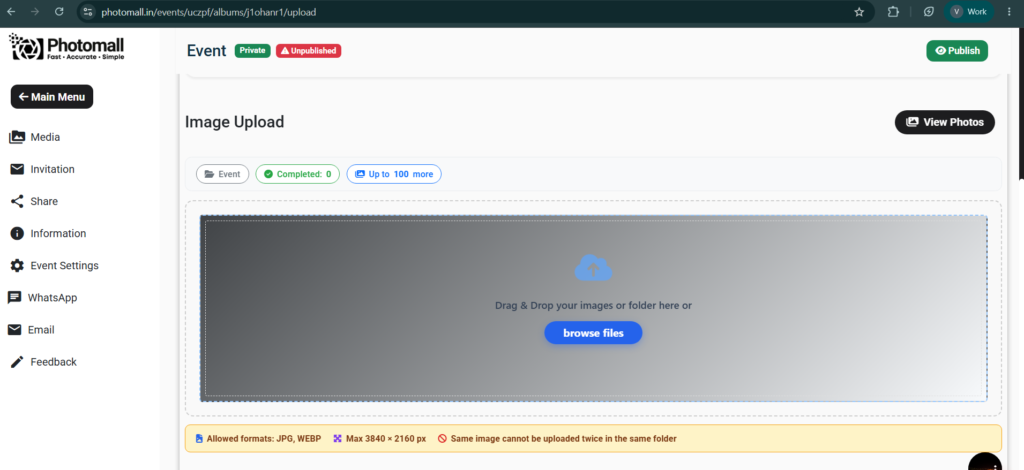
Photomall’s resize is proportional, not a crop, and it lands almost exactly on the ceiling Photomall states on its own upload screen: Max 3840 x 2160 px, which is 8.29 megapixels. We measured 8.00. The behaviour matches the disclosure, and Photomall shows that disclosure before you upload rather than after a guest downloads.
What it means in practice. An 8 megapixel file is fine on a phone screen. It is not enough to crop into, and it is thin for a large print. The camera model, lens and capture date are also gone from the downloaded file, so the photo carries no record of how it was shot. If your clients only view on phones, none of this will cost you anything. If they print, crop or archive, it is the whole decision.
How can you test photo compression yourself?
Do not take our word for it. This works on any platform, including ours.
- Pick one photo straight off the camera. Write down its size in bytes and its pixel dimensions from the file properties panel.
- Upload that single file to the platform you are testing.
- Open the gallery as a guest, not as the account owner, and download it.
- Compare the byte count, not the megabytes. Windows rounds megabytes and hides the difference.
- Open the downloaded file’s properties and look for camera model, lens and date taken. If they are gone, the file was re-encoded.
If the byte count matches, you have the original. If the pixel dimensions dropped, it was resized. If only the byte count dropped, it was re-compressed. If the camera fields are empty, the metadata was stripped. Those are four separate things and a platform can do any combination of them.
How do the plans compare, plan by plan?
Photomall sells four families of plan: Per Event, Starter, Unlimited and Limited. The prices below were read from photomall.in/en/pricing-offers on 13 August 2026, and TurtlePic’s from its plan page the same day. Every TurtlePic plan includes AI face recognition, unlimited events and unlimited photos within your storage, and storage you can reuse without limit.
Photomall Standard against TurtlePic Standard
Photomall’s Standard plan sits under its Unlimited Plans tab. Below is its published feature list set against Business and against TurtlePic. The feature names are Photomall’s own, read from both plan cards on 13 August 2026.
| Feature, as Photomall names it | Photomall Standard Rs 22,000/yr | TurtlePic Standard Rs 15,000/yr |
|---|---|---|
| AI Photo Sharing | Not listed on this plan | Yes, and on every plan from Rs 750/month |
| Bulk Download | Not listed on this plan | Yes, and on every plan |
| Unlimited Photos | Not listed on this plan | Not offered. Storage metered instead |
| Unlimited Events | Listed | Yes, and on every plan |
| Client Photo Selection | Listed | Yes, and selected photos download at original resolution |
| Video Sharing | Listed | Yes |
Read as published, Standard is Photomall’s client-selection and website product rather than its AI photo-sharing one. That matters because Standard is the plan whose monthly price matches TurtlePic Standard exactly. Photomall does list AI Photo Sharing and Unlimited Face Recognition on Business, and on its Limited plans.
| Billing period | Photomall Standard | TurtlePic Standard (500 GB) | Difference |
|---|---|---|---|
| Monthly | Rs 1,950 | Rs 1,950 | Identical price |
| Quarterly | Rs 6,000 | Rs 5,100 | TurtlePic Rs 900 lower |
| Yearly | Rs 22,000 | Rs 15,000 | TurtlePic Rs 7,000 lower |
At monthly billing the two plans cost exactly the same amount. For that money TurtlePic includes AI face recognition and original-resolution delivery. Photomall Standard does not list face recognition at all, and delivers photos resized.
Photomall Business against TurtlePic
Business is the Photomall plan that publishes Unlimited Photos, with deletion unrestricted. TurtlePic does not offer an unlimited photo count on any plan, so this is a genuine difference in what the two products sell. It is also the most expensive plan either company offers.
| Billing period | Photomall Business | TurtlePic Pro (1 TB) | TurtlePic Elite (2 TB) |
|---|---|---|---|
| Quarterly | Rs 11,000 | Rs 6,500 | Rs 10,500 |
| Yearly | Rs 40,000 | Rs 22,500 | Rs 32,000 |
Photomall Business at Rs 40,000 a year costs more than TurtlePic’s most expensive plan. TurtlePic Elite is Rs 32,000 for 2 TB, and at a 2 MB delivered file that is over a million photos held at once, refillable without limit. The photos Business delivers are the resized ones we measured above.
Photomall Limited plans, and what “delete and re-upload anytime” means
Every Photomall Limited plan publishes two photo numbers, and they mean different things. Here is Silver Pro, their Rs 8,499 per year plan, exactly as the card reads:
Photomall Silver Pro · Rs 8,499 per year
Upload & Share up to 2,00,000 Photos
Store up to 1,00,000 Photos — delete & re-upload anytime
Photomall Silver Pro plan card, Rs 8,499 per year. Read on the Limited Plans tab of photomall.in/en/pricing-offers, 13 August 2026.
Those two numbers are two different limits.
- Store up to 1,00,000 is how many photos the plan holds at any one moment.
- Upload & Share up to 2,00,000 is the total the plan will ever accept.
So the plan runs like this:
- Upload 1,00,000 photos. The plan is now full.
- Delete all 1,00,000. The space comes back, exactly as the card says it will.
- Upload 1,00,000 more. The plan is full again.
- You have now uploaded 2,00,000 photos, which is the upload allowance. The plan will not accept any more, no matter how much you delete.
That is one refill. The phrase “delete and re-upload anytime” is accurate about the deleting. The ceiling is on the uploading, and on every Limited plan that publishes both numbers it is exactly twice the storage figure.
| Photomall Limited plan | Price per year | Storage at one time | Upload allowance | Refills this buys |
|---|---|---|---|---|
| Silver Basic | Rs 3,799 | 20,000 | 40,000 | 1 |
| Silver Plus | Rs 5,699 | 50,000 | 1,00,000 | 1 |
| Gold Essential | Rs 7,699 | 50,000 | 1,00,000 | 1 |
| Silver Pro | Rs 8,499 | 1,00,000 | 2,00,000 | 1 |
| Gold Basic | Rs 14,499 | Not stated | 3,00,000 | Not stated |
| Diamond Plus | Rs 25,999 | Not stated | 6,00,000 | Not stated |
Note the last two rows: Gold Basic and Diamond Plus publish an upload figure and no storage figure at all, so we cannot say the same ratio applies to those two.
TurtlePic works the other way. Delete an event that has been delivered and the space comes back, every time, on every plan, with no cap on how often. There is no lifetime upload allowance to run out of. What you cannot do is exceed your storage tier, or put more than 30,000 photos in a single event.
How many photos fit, and how many times can you refill?
These are calculations, not measurements, and the answer depends on your average file size. Below is the arithmetic at four file sizes so you can find your own. Gigabytes are binary, matching what Windows shows you.
Photomall’s plans count photos, not bytes, so its numbers do not move with file size. What moves is the file itself. Photomall states a ceiling of 3840 x 2160 px on its upload screen, and the one 25.1 MB original we tested came back at 2.21 MB and 8.0 megapixels. The bottom two rows are file sizes Photomall does not hand back, at any plan or price.
| Average file you deliver | TurtlePic Starter 50 GB · Rs 6,000 | TurtlePic Standard 500 GB · Rs 15,000 | Photomall Silver Plus Rs 5,699 | Photomall Silver Pro Rs 8,499 |
|---|---|---|---|---|
| 2 MB | 25,600 refills without limit | 256,000 refills without limit | 50,000 held 1,00,000 for the year | 1,00,000 held 2,00,000 for the year |
| 5 MB | 10,240 refills without limit | 102,400 refills without limit | 50,000 held 1,00,000 for the year | 1,00,000 held 2,00,000 for the year |
| 10 MB | 5,120 refills without limit | 51,200 refills without limit | Not returned at this size | Not returned at this size |
| 25 MB a full-resolution original | 2,048 refills without limit | 20,480 refills without limit | Not returned at this size | Not returned at this size |
The other TurtlePic tiers scale the same way. At a 2 MB delivered file, Basic (100 GB, Rs 11,000) holds 51,200, Pro (1 TB, Rs 22,500) holds 524,288, and Elite (2 TB, Rs 32,000) holds 1,048,576, all refillable without limit.
Read the 25 MB row honestly, because it is the one that costs us something. Storage metering is harder on large originals, not easier. If you deliver 25 MB originals, TurtlePic’s 500 GB plan holds about 20,480 of them at a time. That is the trade for getting the original file back. The row that matters to you is the one matching what your camera produces.
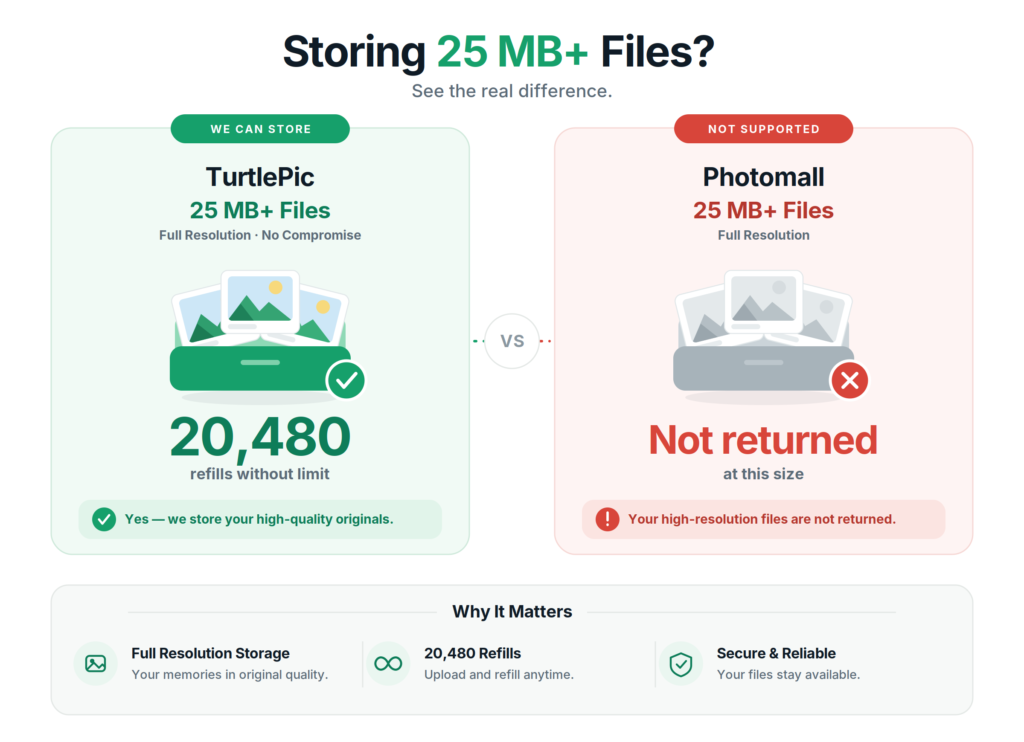
The refill count is where the two models separate. At a 2 MB delivered file:
| Plan, at a 2 MB delivered file | Holds at once | Refills allowed | Total photos over a year |
|---|---|---|---|
| Photomall Silver Plus, Rs 5,699 | 50,000 | 1 | 1,00,000, then upgrade |
| Photomall Silver Pro, Rs 8,499 | 1,00,000 | 1 | 2,00,000, then upgrade |
| TurtlePic Starter, Rs 6,000 | 25,600 | Unlimited | No ceiling |
| TurtlePic Standard, Rs 15,000 | 256,000 | Unlimited | No ceiling |
A photographer shooting 30 events a year at 8,000 photos each moves 240,000 photos. On Silver Plus that is past the allowance before the year is out. On TurtlePic Starter it is 25,600 at a time and you clear delivered events as you go, for Rs 6,000, with face recognition on every one of them.
What can a client actually do with a photo selection?
Both platforms let a client mark favourites. What differs is what the photographer can do with that selection once it exists, and this is where the resolution question comes back.
- Favourites appear on the photographer’s TurtlePic dashboard as the client picks them.
- Selected photos download in original resolution, not a preview copy.
- The file names of the selected photos export to a spreadsheet.
- The selection exports straight to Lightroom, so the edit list arrives in the editing software instead of being retyped.
The original-resolution part is the one that matters, and it follows from everything above. A selection workflow is only as good as the file it hands back at the end of it. Choosing an image and then receiving a resized copy of it defeats the point of choosing.
When is Photomall the better choice?
Three cases, stated plainly, each with the condition that ends it.
Your entry budget is under Rs 6,000
Silver Basic is Rs 3,799 a year against TurtlePic’s Rs 6,000 Starter, and it includes face recognition. The condition: it holds 20,000 photos at a time and allows 40,000 across the year. Past that you move up a plan, and the photos are delivered resized.
You need e-Albums, live streaming or regional language support
Photomall bundles e-Album creation, live event streaming, and published support phone lines in eight languages including Tamil, Telugu, Kannada and Malayalam. It also offers EMI payment plans. TurtlePic does not offer any of those. Two conditions. None of them change what arrives when a guest downloads a photo, and the e-Album stays viewable only while the Photomall subscription is active.
You need an uncapped photo count and compressed resolution is fine
Photomall Business publishes unlimited photos with unrestricted deletion. TurtlePic does not sell that at any price. The condition: it is Rs 40,000 a year, more than TurtlePic’s largest plan, and the photos are the 8 megapixel resized ones. Unlimited applies to how many, not to what each one is.
The short version
Photomall is the broader product. It bundles a website, billing, albums and proofing, it costs less to start at Rs 3,799, and it tells you its resolution ceiling before you upload.
TurtlePic does one thing Photomall does not: it returns the file you uploaded. In our test on 9 August 2026 the same 25.1 MB camera file came back from TurtlePic byte for byte, with all 62 EXIF tags and the full 44.8 megapixels, and came back from Photomall at 2.21 MB and 8.0 megapixels with the camera fields removed. On price, TurtlePic Standard matches Photomall Standard exactly at monthly billing and is Rs 7,000 cheaper across a year, with face recognition Photomall Standard does not list. And your storage refills without a ceiling, where a Photomall Limited plan refills once.
If you want the same test run against another platform, we published one for TurtlePic and Kwikpic, and a wider look at photo sharing apps for high-resolution photos. For how guest delivery works, see sharing event photos with guests.

Frequently asked questions
These are the questions Google actually shows for Photomall searches, captured on 13 August 2026. We have answered the ones a buyer would ask and left out the ones about what a photographer should charge their clients.
Is Photomall reliable?
It depends what you need to rely on. If you need your photos back the way you shot them, our measurement says no. On 9 August 2026 we uploaded a 25.1 MB camera file and downloaded it as a guest: it came back at 2.21 MB and 8.0 megapixels, with 59 of its 62 EXIF tags gone and no record of the camera, lens or capture date. Reproduce it in five minutes with any file off your own camera. If you need the plan to last the year, read the two numbers on the card before you buy. Every Photomall Limited plan accepts exactly twice what it stores, so it fills, empties, fills once more, and then stops. On uptime and support response we have no measurement either way.
How do you share 1000 photos at once?
Upload them once and let guests find their own. On TurtlePic a guest scans a QR code, takes a selfie, and gets only the photos they appear in, so nobody scrolls 1,000 images looking for themselves. Both TurtlePic and Photomall work this way. The difference is what each guest downloads at the end of it: TurtlePic returns the file you uploaded, and Photomall returns a version resized to fit 3840 x 2160 pixels. For 1,000 photos at 5 MB each you need roughly 5 GB of storage on TurtlePic, which the Rs 6,000 Starter plan covers about ten times over.
What is the best app for instant photo sharing?
For events where the photos still matter afterwards, TurtlePic. It is the only one of the two that gave back the file we uploaded: 26,336,649 bytes in, 26,336,649 bytes out, all 44.8 megapixels, all 62 EXIF tags, checksum identical. Face recognition comes on every plan from Rs 750 a month, storage refills as often as you like, and selected photos download at full resolution straight into Lightroom. Do not take that on trust. Upload one photo from your camera, download it as a guest, and compare the byte count and the pixel dimensions. Five minutes settles it for any platform, ours included. The one case where Photomall is the better answer: if you want a portfolio website, billing software and e-Albums in the same subscription, it carries all three and TurtlePic carries none.