
FREE WEDDING QR CODE + PRINTABLE TABLE CARDS
Wedding QR Code Generator
Paste your link, pick a design, print your QR table cards and signs. Free, no sign-up, never expires.
Make a free wedding QR code in a minute: a QR code for wedding photos, your RSVP form, your wedding website or the way to the venue. Pick one of 18 designs, from classic and floral to Indian styles like Jharokha and Marigold Toran. The card fills itself in with a headline like "Find your photos", a short message and 3 small steps, and you add your names, date and hashtag. Then tell us where it will go, and print table cards at home, or send a ready PDF for an easel board or a roll-up standee to any print shop. Your code is a plain static code, so it never expires and needs no account. No sign-up, no watermark.
Updated:
- Free
- No sign-up
- No watermark
- Never expires
- 18 designs, 6 Indian
- PDF, PNG + SVG
Free · Never expires · Works on your phone
How it works
- What it opens
- Make it yours
- Where it goes
What should your QR code open?
What should your QR code open?
Pick one. You can make another code for something else after.
Your TurtlePic links
These three use the links from your TurtlePic event. Not using TurtlePic? Pick "Other link".
Any other link
Google Photos, Google Drive, a map or any website.
Google Photos, Google Drive, a map, another wedding website or an RSVP form.
Your code opens:
Your link stays on your phone or laptop. We don't see it or store it.
Make it yours
Make it yours
Your card is already filled in from your link. Open any row to change it, or go straight to "Where will it go?".
Keep it to 30 characters. Most couples use first names.
Keep it to 40 characters, like "Venue name, City".
Shown on boards and standees only.
We removed the spaces so your hashtag works.
Keep it to 30 characters.
No hashtag yet? Our free wedding hashtag generator can make one.
Making one set per function? Change only the function label and colours, and keep the design the same.
Not offered for this link.
Keep each step to 20 characters.
Most guests haven't found photos with a selfie before. Three small steps help.
Only add a date your photographer has promised.
This link is too long to print neatly. Leave it off, or use a shorter link.
For guests whose camera won't scan. Printed as plain text.
Your initials sit in a small circle in the middle of the code. The code is built to still scan with it. Test it after.
Added initials? Scan it again to be sure.
Colours
Dark code on a light panel scans best. Printed colours can look a little different from your screen.
Not shown on small items like this one.
Making these for a couple you're shooting? Add your logo, a credit line and your Instagram handle. They sit small at the bottom, well away from the code.
Logo
PNG, SVG or JPG, up to 2 MB. A see-through PNG looks best. Use a logo at least 600 pixels wide so it stays sharp on standees.
Your logo is small, so it may look soft on big signs. It's fine for table cards.
Keep it to 30 characters so it fits beside your logo.
Instagram handles use letters, numbers, dots and underscores.
Your logo stays on your phone or laptop. It's never uploaded to us.
Where will it go?
Where will it go?
Pick a place. We'll show the sizes that suit it, with the code at the right size.
Guests scan most at dinner, so put one on every table.
Download your Folded table card
Free, with no watermark.
Need just the code? Download the QR on its own and
Making one for the RSVP and one for the photos? Keep the same design so they look like a set. Many couples print "Wedding website / RSVP" on the invitation and "Your own photos (selfie)" on the table cards.
Free for your wedding and events, including printing. No watermark. The code is yours: it keeps working as long as your link works.
Have you scanned it? Test the code with your phone before you print 30 cards.
Clear your link and choices?
Free AI photo gallery
Your QR code is on every table. Now let AI find every guest's photos.
Put your TurtlePic gallery link in this QR code. Guests scan it, take a selfie, and AI finds every photo they're in.
AI finds every photo from one selfie. Guests see only the photos they're in, in seconds.
One link or QR code. Share the gallery on WhatsApp or print the QR at the venue.
Free forever. 5 GB, AI face search included, no credit card.
No credit card. No time limit.










Telling your guests next? Make a free wedding invitation with RSVP.
WEDDING QR CODE GUIDE
How to make a wedding QR code
Pick what it opens. Your own photos (each guest finds theirs with a selfie), everyone's photos, your wedding website and RSVP, or another link: a Google Photos album, the venue on Google Maps, or any web address.
Paste your link. Copy it from the Share button of your gallery, form or map. For the venue, you can also just type the venue name and city.
Test it. Point your phone camera at the code on screen. It should open your link in a second or two.
Pick a design and make it yours. Choose one of 18 designs, and your card is already filled in from your link: a headline, a message and, for a selfie gallery, 3 small steps. Add your names, the function (mehndi, haldi, sangeet, reception or the wedding day), the date, your hashtag or initials in the code.
Tell us where it will go. Guest tables, the entrance, beside the stage, the photo booth, the food counter or bar, or the invitation card. We show the sizes that suit that place, with the code at the right size.
Download and print. Home sizes print on A4 or US Letter. For boards and roll-up standees, send the PDF to any print shop. You also get PNG and SVG files.
It's free, with no sign-up and no watermark. Your link never leaves your phone or laptop. Use it for every function, from the engagement and mehndi to the reception.
5 ways to use a QR code at your wedding
Each guest's own photos
The most popular use. Print the code on table cards and a sign by the dance floor. If your photographer's gallery has AI face search, like TurtlePic, use the selfie link: each guest scans, takes a selfie and sees only the photos they're in. No scrolling through thousands of photos. More on choosing a gallery in section 7.
Everyone's photos
Some couples want family to see the whole wedding, not just their own photos. Use the "Everyone's photos" link for that, and think about where you print it: anyone who scans it can open every photo. For the guest tables, the selfie link is usually the better choice.
RSVP and your wedding website
A wedding RSVP QR code on the invitation or an insert card lets guests reply from their phone, right away. If your invite is a TurtlePic Event Website, one code opens the schedule, venue, dress code and the RSVP button. Keep a short line beside it: "Please RSVP by 12 February 2027". Using a Google Form or another wedding website? Pick "Other link".
The way to the venue
On Indian wedding cards, a location QR code is now common, and for good reason. Out-of-town guests and older relatives often find a printed map hard to follow. A code that opens Google Maps with the venue already pinned takes them straight there. Make one per venue if your functions are in different places.
Anything else
A playlist for the sangeet, a live stream for family abroad, the menu, the seating plan, a dress-code page. If it has a link, it can have a code.
Tip: one code, one job. A card that says "Scan to RSVP" gets scanned. A card with three codes and no words confuses guests. If you need several, make one code per job in the same colours, so they look like a set.
Will my wedding QR code expire? Static vs dynamic codes
A static QR code holds your link inside the pattern itself. When a guest scans it, their phone opens your link directly, with nothing in between. It doesn't expire, it needs no account, and nobody can switch it off. It keeps working as long as the link it opens keeps working. That's the kind of code this tool makes.
A dynamic QR code holds a short link to the QR company's server, which then sends the guest on to your page. That lets you change the page after printing and count scans. But the code only works while that service keeps it on. Many "free" dynamic codes are free for a trial only. When the trial ends, the code can stop working, sometimes after the invitations are already out. Some free wedding QR sites also make a code that only opens their own gallery, so moving your photos later means reprinting.
So which should you pick?
- Static (this tool) if your link is final: your gallery, your RSVP form, your website or the venue. That's most weddings.
- Dynamic (paid) if you must print before you know the final link, or you truly need scan counts. Read the terms first: how long it stays on, and what happens when you stop paying.
A simple way to keep a static code flexible: point it at a page you control, like your wedding website or a gallery you can add photos to later. You can change what's on the page any time, and the code stays the same.
QR code for wedding photos: where should it point?
A wedding photo QR code is only as good as the gallery it opens. Here are the common choices. This tool works with all of them.
| Gallery | Good for | Watch out for |
|---|---|---|
| A photo gallery service (for example the TurtlePic gallery your photographer shares) | Professional photos, everyone in one place, guests don't need an account. With AI face search, guests take a selfie and see only the photos they're in. For printed cards, use TurtlePic's guest link (the one without a code at the end). | Check how long the gallery stays online on your plan. |
| Google Photos shared album | Free, easy, guests can add their own photos. | Use the shared link (Share › Create link), not the album address from your browser. Guests may need a Google account to add photos. Hundreds of guests' photos end up in one long scroll. |
| Google Drive folder | Free, full-size files. | Set the folder to "Anyone with the link", or every guest has to request access. No easy way for guests to find themselves. |
Most guests want the photos they're in, not every photo from every function. With a big wedding over several days, that's a lot of scrolling. A gallery with AI face search lets each guest skip it.
How big should a wedding QR code be? Size and printing guide
A common rule of thumb: make the code about one tenth of the distance it's scanned from. A guest at a table holds their phone 30 to 60 cm away, so 5 to 6 cm would do. We make it bigger on purpose, about half the card, so it's the first thing guests see. A board at the entrance, read from 2 to 3 metres, needs 25 to 30 cm. Go a little bigger if the light is low, as it often is at a sangeet or reception. Keep a clear white margin around the code, too; it helps phones find it. These are rules of thumb from QR makers, not a fixed standard, so always test a printed copy. The tool sets the code size for you on every card and sign.
| Where it goes | Size | Code size | |
|---|---|---|---|
| Guest tables | Folded table card (A4 or Letter, folded) | 7.5 cm | At home |
| Guest tables | Card for a stand, A5 or 5 × 7 in | 7 cm | At home |
| Guest tables | Small card, A6 or 4 × 6 in | 5.5 cm | At home |
| Entrance / welcome | Easel board 18 × 24 in | 25 cm | Print shop |
| Entrance / welcome, stage side | Easel board 2 × 3 ft | 30 cm | Print shop |
| Entrance / welcome | A3 board | 15 cm | Print shop |
| Entrance, stage side, photo booth | Roll-up standee 2.5 × 6 ft | 28 cm | Print shop |
| Entrance, stage side | Roll-up standee 3 × 6 ft | 28 cm | Print shop |
| Photo booth, food counter, bar, gift table | A4 or Letter sign | 10 cm | At home |
| Food counter, bar, gift table | A5 or 5 × 7 in card | 7 cm | At home |
| Invitation card | Code only, for your card designer | 2.5 cm (2 cm minimum) | Card designer |
| Place cards, favour tags | 3.5 × 2 in, 6 place cards or 8 tags per sheet | 2.2–2.5 cm | At home |
| Round stickers | 2 in circles on sticker paper | 3 cm | At home |

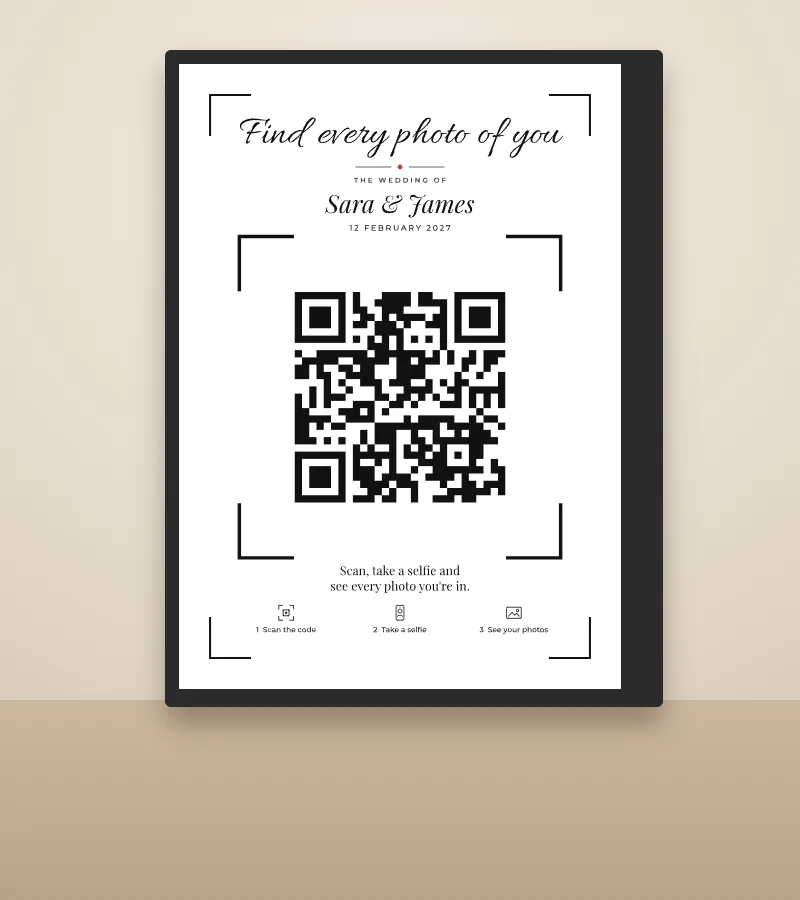
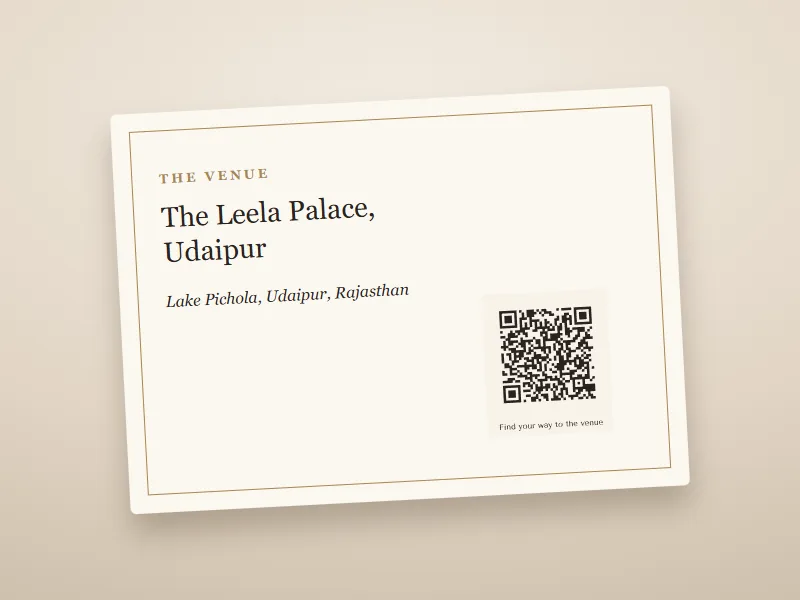
Folded table card · Ivory Classic Card for a stand · Big Initials Easel board 18 × 24 in · Jharokha Roll-up standee 2.5 × 6 ft · Marigold Toran Photo booth sign · Viewfinder Invitation QR · venue location
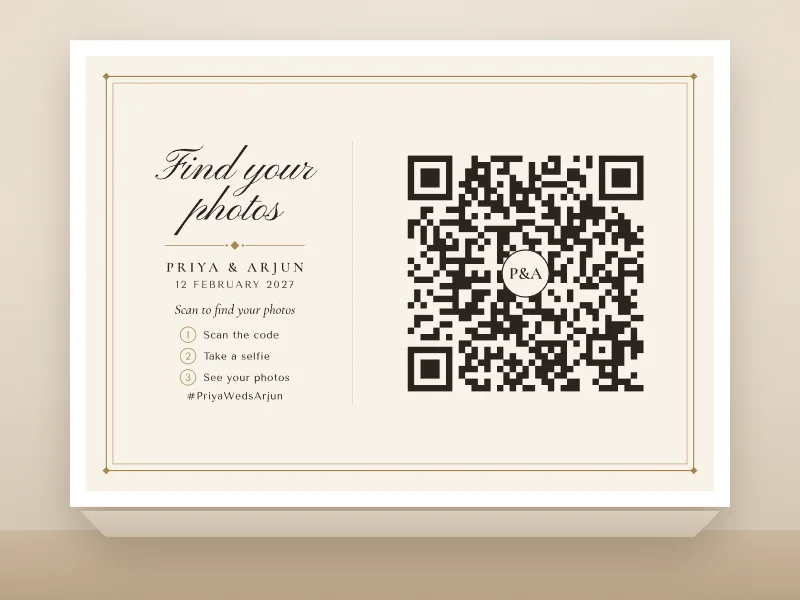
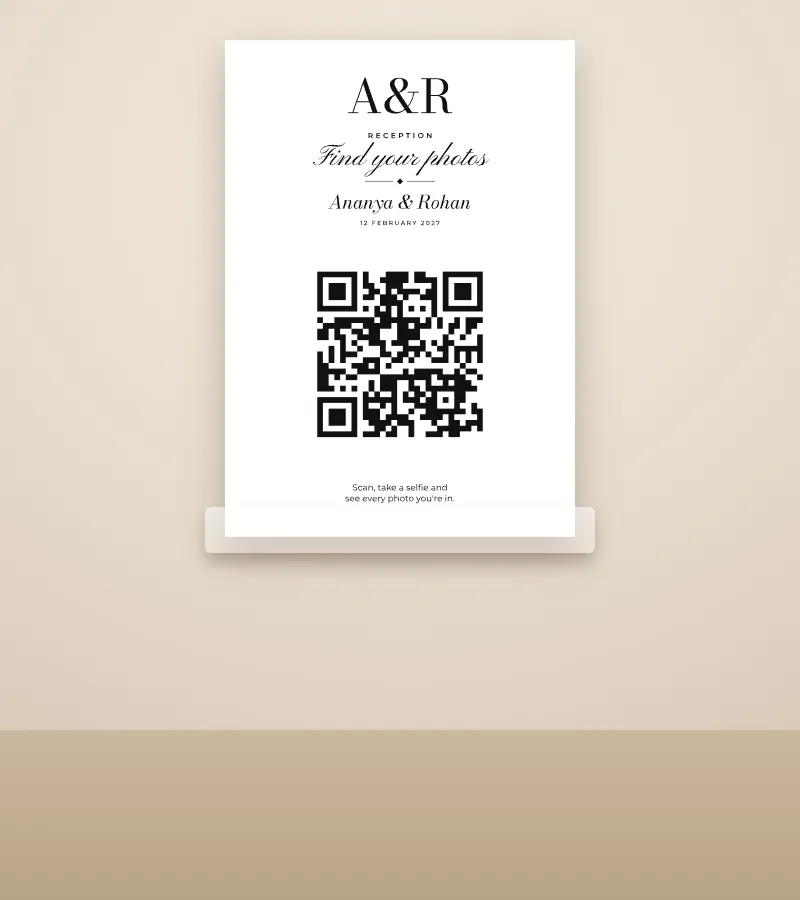
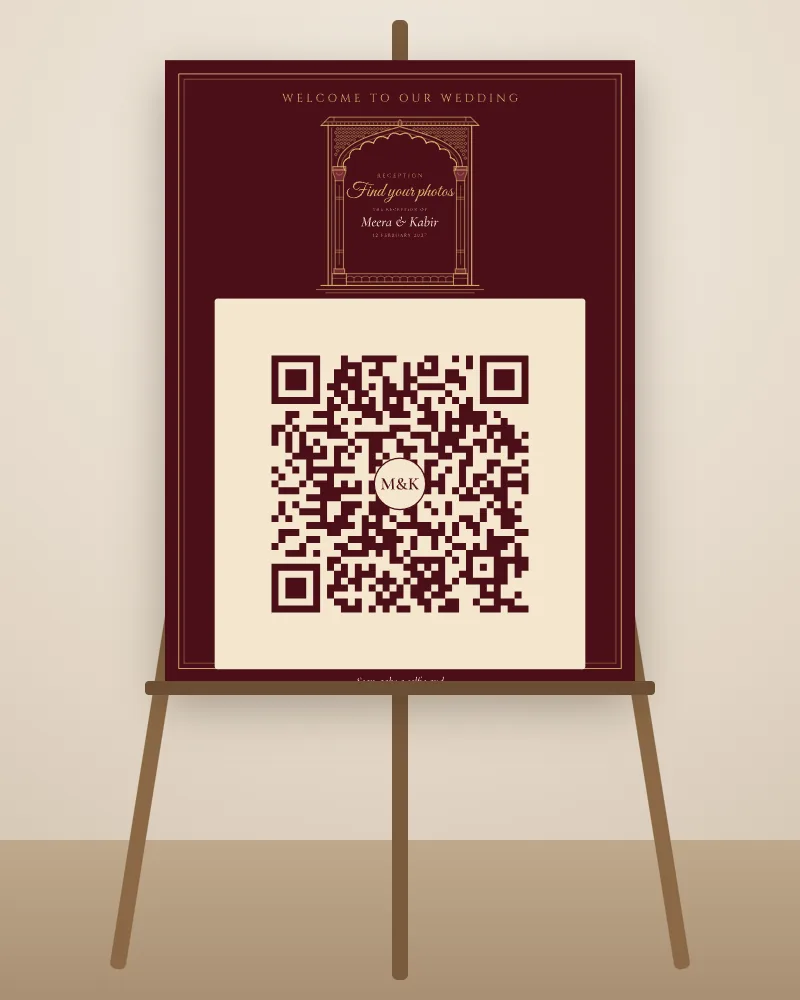
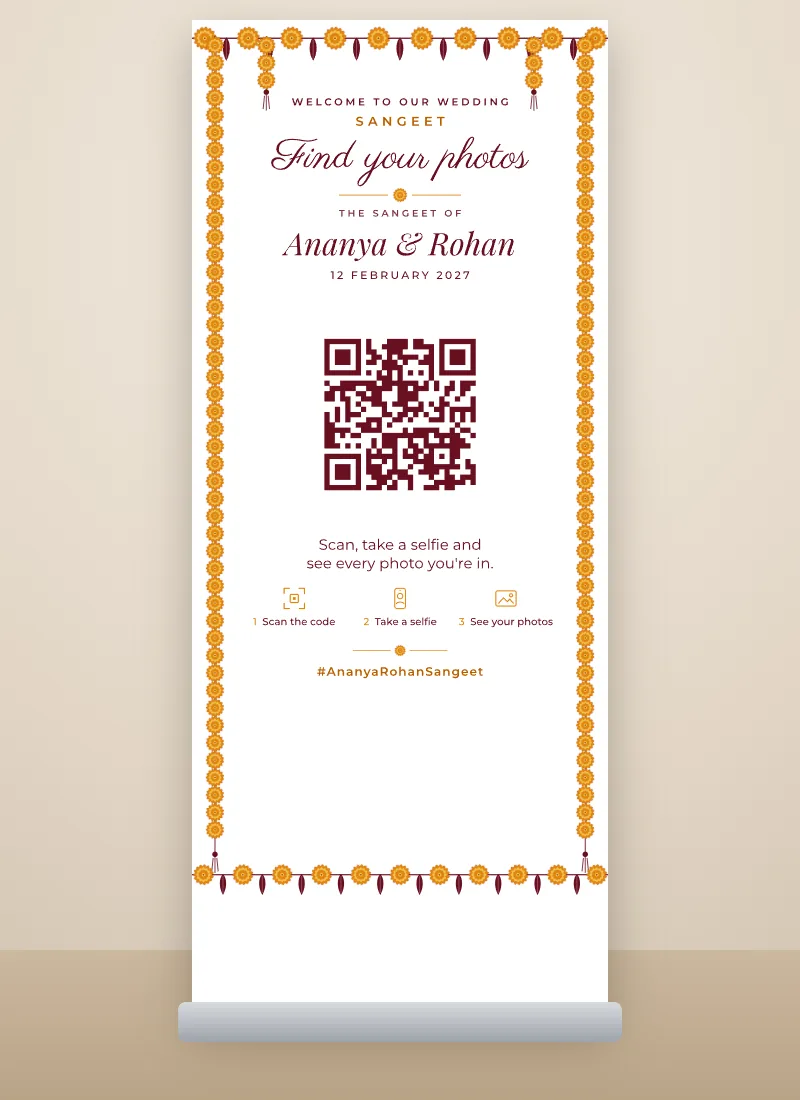
Roll-up standees
A roll-up standee is a tall printed banner that rolls out of a base and stands on its own. They're common at Indian receptions and sangeets, and 2.5 × 6 ft is the size most print shops offer. Two things matter. The stand's base hides the bottom few centimetres, and the people in front hide the rest of the lower part. So the tool keeps the bottom 20 cm free of words and puts a big 28 cm code at phone height, centred about 112 cm from the floor, with the headline and your names above it and the message and steps right under it.
Printing at home
- Print at 100%. In the print box, pick "actual size", not "fit to page".
- Thick card for table cards. Card of 250–300 gsm stands up well when folded. Score the fold line with a ruler and the back of a knife for a clean fold.
- Cut on the marks. Two A5 cards fit on one A4 sheet, four A6 cards on one A4, six place cards or eight favour tags on one sheet. The PDF shows where to cut.
- Leave the white border. Home printers can't print to the edge of the paper, so home files keep a thin white border on purpose.
Printing at a print shop
- Send the PDF, never a screenshot. For a designer, send the SVG: a file that stays sharp at any size.
- Ask for matte, not glossy. Glossy board reflects the venue lights, and a shiny code can be hard to scan. Sunboard (foam board) on an easel is the usual choice for boards in India.
- Bleed is already in the file. Bleed is a thin extra edge (3 mm, or 1/8 in for US sizes) that the shop trims off, so the colour reaches the edge. Just tell the shop the size.
- Ask for one proof before a big order, and scan it from where guests will stand.
Before you print: checklist
- The link opens the right page on Android and iPhone.
- It opens without asking guests to sign in or request access.
- The page works on a phone (try it on mobile data, not your home Wi-Fi).
- With initials in the centre, it still scans in one go.
- The code is printed at the planned size, with a white margin around it.
- Your partner has checked the names and date.
Where to put QR codes at your wedding
- On every guest table: a folded table card or a card in a stand. Guests sit for a long time at dinner, which is when they scan.
- At the entrance: an easel board or a roll-up standee with the welcome line and the code, so guests see it as they arrive.
- Beside the stage: at the reception, the sangeet or the varmala, guests queue to meet the couple. A roll-up standee by the stage catches them while they wait.
- At the photo booth or selfie point: phones are already out. An easel board or an A4 sign works well.
- At the food counters, the bar and the gift table: a small A4 or A5 sign guests read while they wait.
- On the invitation card and small items: the venue or RSVP code on the card, and a small code on place cards, favour tags or stickers.
- In WhatsApp: send the PNG to the family group the morning after, with "Scan for the wedding photos". Many guests find a code easier than a long link.
One set per function
Many Indian weddings have three to five functions. Keep the same design and change only the function label and colours: mehndi green and gold for the mehndi, saffron and maroon for the haldi, emerald and gold for the sangeet, maroon and gold for the wedding day, and navy or black and white for the reception. Guests know at once which code is for which night.
Which design suits which function?
- Classic and timeless: Ivory Classic, Script & Serif, Laurel Crest. Right for the wedding day, a church wedding or a hotel reception.
- Modern: Gallery Modern, Big Initials, Soft Arch. Clean and easy to read from far away.
- Floral: Line Botanical and Laurel Crest for garden and day functions.
- Indian: Jharokha for the wedding and reception, Marigold Toran for the haldi and mehndi, Paisley Mehndi for the mehndi, Peacock Pair for the sangeet, Mughal Garden and Block Print for elegant or garden functions. All are decorative, with no religious symbols, so any family can use them.
- For the photos: Viewfinder and Instant Print are made for a code that opens the photo gallery.
- Party: Wavy Frame and Confetti for the cocktail night, the after-party or a bridal shower.
Photographers: add your brand logo
Making these cards for a couple you're shooting? Open the "Photographer" row and add your studio logo, a credit line like "Photos by Lens & Light Studio" and your Instagram handle. It sits small at the bottom of every table card, sign and standee, well away from the code, so guests scan the code and still see who took the photos. Your logo stays on your device; it isn't uploaded anywhere.
Putting a QR code on your wedding card
A QR code on the wedding card is now common, in India and abroad. Most etiquette guides agree it's fine, as long as it doesn't crowd your names on the front. Put it on the back, on an insert card, or on the details or RSVP card, with a clear line like "Find your way to the venue" or "Scan to RSVP". Download the invitation QR (2.5 cm is a safe size), and send the SVG to your card designer so it prints crisp.
More printable wedding signs, coming soon
We're building a Welcome Board Maker and a seating chart with name place cards from your guest list, with the same simple steps. Coming soon.
Wedding QR code: questions
Yes. The code, all 18 designs, every card, sign and standee and all the files are free. There's no paid version and no watermark.
No. You don't give an email or a phone number. Pick what it opens, paste your link, pick a design and download.
No. It's a static code: your link is stored inside the pattern itself, with no server in between. It works for as long as the page it opens is online.
Not with a static code. If your link might change, point the code at a page you control, like your wedding website or a gallery you can keep adding to. Or use a paid dynamic code, and check how long it stays active first.
Get your gallery's share link first. If your photographer uses TurtlePic, pick "Your own photos (selfie)" and paste the guest link, so each guest takes a selfie and sees only their own photos. Pick "Everyone's photos" for the full link that opens every photo. For Google Photos or Drive, pick "Other link". Then test the code with your phone, pick a design and print. For a Drive folder, set it to "Anyone with the link" first.
A rule of thumb is one tenth of the scanning distance. That's about 2.5 cm on an invitation card. We go bigger where there's room: 7.5 cm on the folded table card (about half the card), 10 cm on an A4 sign, 25 to 30 cm on boards and 28 cm on roll-up standees. The tool sets the size for each item. Always print one copy and test it.
An 18 × 24 in easel board suits most venues. For a big entrance or a lawn, pick a 2 × 3 ft board or a roll-up standee (2.5 × 6 ft is the most common size in India). Send the PDF to a print shop and ask for matte sunboard or a roll-up standee.
Yes. Everything tagged "Print at home" fits on A4 or US Letter: table cards, A5 and A6 cards, A4 signs, place cards, favour tags and stickers. Print at 100% on thick card and cut or fold on the marks. Boards and standees need a print shop.
Four things are enough: a big headline ("Find your photos"), your names, one line on what happens when guests scan ("Scan, take a selfie and see every photo you're in"), and the code. For a selfie gallery, add the 3 small steps, because many guests haven't done it before. On the big boards you can add a welcome note, the venue and your hashtag. The tool fills all of this in from your link, so you only change what you want.
Yes. Turn on "Add your initials" and they sit in a small circle in the middle. The code is built to still scan with it, but scan it again after adding them to be sure.
Yes. Open the "Photographer" row, add a PNG, SVG or JPG up to 2 MB, a credit line like "Photos by Lens & Light Studio" and your Instagram handle. It sits small at the bottom of the cards, signs and standees, away from the code. Your logo stays on your device.
Yes, six: Jharokha, Marigold Toran, Paisley Mehndi, Mughal Garden, Block Print and Peacock Pair. They use decorative motifs like palace arches, marigolds and paisley, with no religious symbols, so any family can use them.
Yes. Pick "Invitation card and small items", download the invitation QR and put it on the back, an insert or the RSVP card, with a short line saying what it opens. Send the SVG to your card designer.
Yes. For a TurtlePic Event Website, pick "Wedding website / RSVP" and paste its link. For a Google Form or another RSVP page, pick "Other link", then "Any link". For a Google Form, use the "send" link, not the edit link.
Yes. Pick "Other link", then "Venue location", and paste a Google Maps link, or just type the venue name and city. Scan it to check it finds the right place, especially for venues with similar names.
Both open your TurtlePic gallery. "Your own photos (selfie)" uses the guest link: each guest takes a selfie and sees only the photos they're in, which suits printed cards. "Everyone's photos" uses the full link with a code at the end: anyone who scans it can open every photo of the event.
No. Most phone cameras read QR codes on their own: guests open the camera, point it at the code and tap the link.
Check the link first: open it on your phone. Then try more light, a darker code colour, a bigger size or no initials in the centre. A clear white margin around the code helps too.
Not in this tool. It makes codes for links like galleries, forms, websites and maps only.
More free wedding tools
Wedding Hashtag Generator
Turn your two names into 30+ wedding hashtags, from classic to desi.
Couple Name Combination Generator
Mix your two names into 12–20 couple names for Instagram, a baby name or a nameplate.
Wedding Invitation Message Generator
Ready wording for invites, function cards, reminders and thank-yous, with your names filled in.
Wedding Captions for Instagram
200+ wedding captions to copy, from short one-liners to the baraat and vidaai.
Wedding Song Finder
300+ wedding songs for every moment, from the baraat and sangeet to the first dance.
Wedding Venues & Vendors Directory
Venues, photographers, makeup artists and planners by city, with links to their own websites.
Wedding Planning Checklist
Everything to do, month by month and function by function, with due dates from your wedding date.
Wedding Budget Calculator
Split your budget by category and function, and track what's paid.
Couple Logo Maker
Turn your initials into a wedding logo.