
Let guests use a photo instead of a selfie
Choose whether guests can pick a photo from their phone, or must take a fresh selfie with the camera.
On this page5 sections
Before you start
- An event you’ve created.
Open Privacy Settings
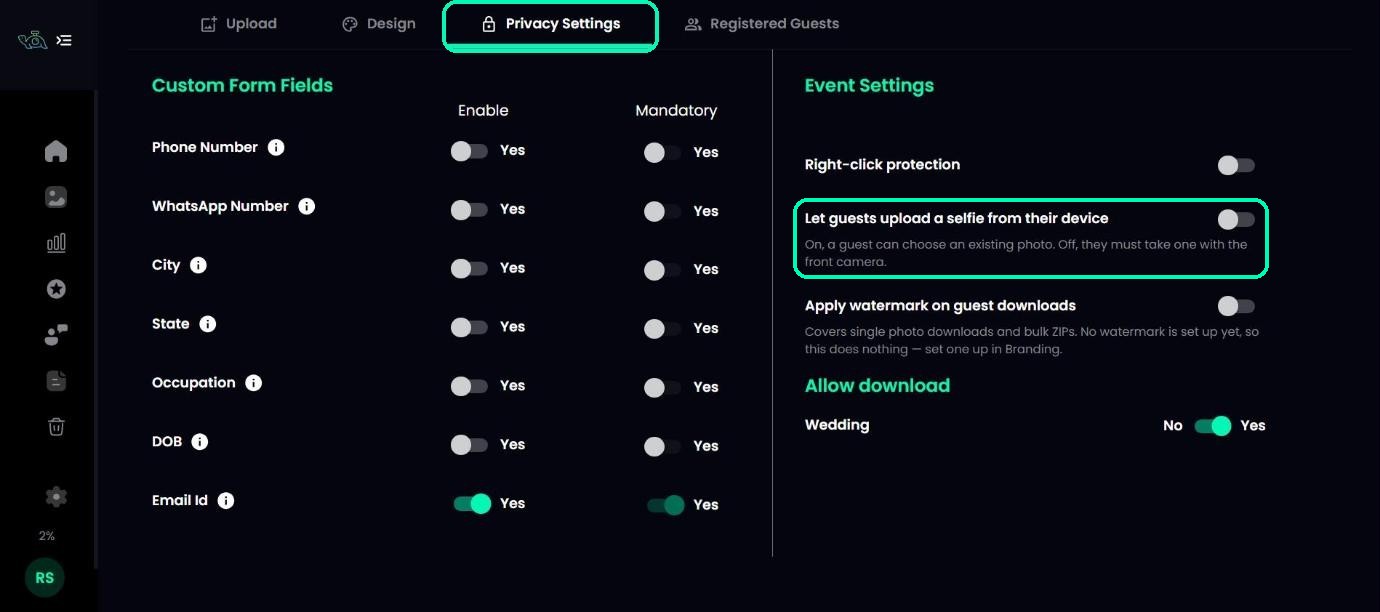
Open your event and click the Privacy Settings tab.
Turn the setting on or off
Find Let guests upload a selfie from their device.
- On: guests can choose a photo they already have, as well as taking a selfie.
- Off: guests must take a selfie with their front camera.
Tip
Turning it on helps guests whose camera is blocked or who are on a computer without a camera.
What guests fill in first
In the same tab, you can choose which details guests enter before their selfie, such as phone number or city. On Free, Starter and Basic plans, email is always on and required. On Standard, Pro and Elite, you can turn email off. See Your event’s privacy settings, explained.
Was this article helpful?
Your answer helps us improve this guide.
Thanks for letting us know.